Google Play Store PC
Gives you access to any type of Apk Android App on your Windows PC.

Safe & Secure
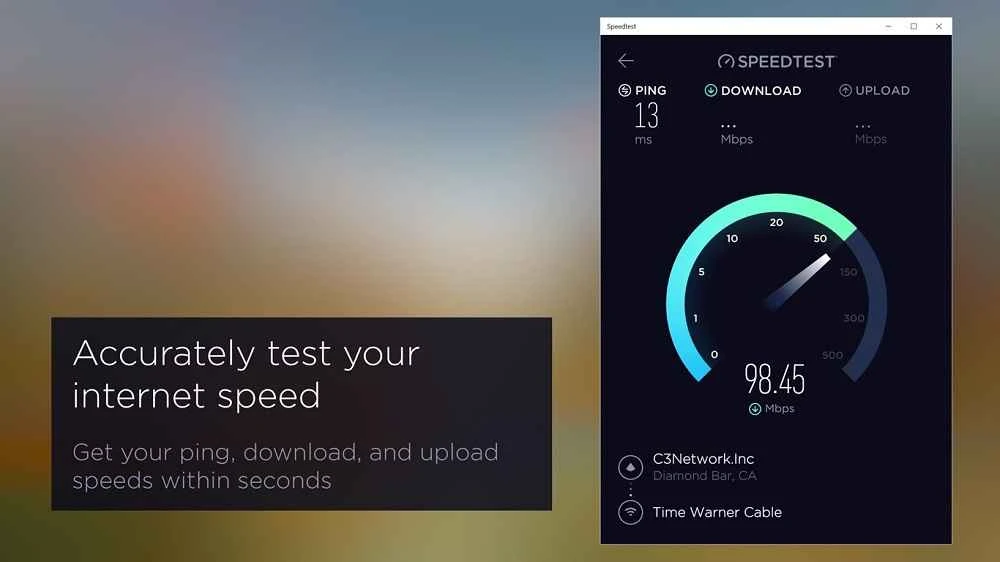
SpeedTest by Ookla is a powerful speed tester to analyze the speed of your Internet connection, offering real-time and comprehensive results. The one-touch connection offers trustworthy data; regardless of to use it to test upload or download speed. The cross-platform utility proves to be the best competitor to InternetTest and EagleGet.
The app offers detailed information, such as Internet provider name, ping, latency, or the time that your PC takes to connect to a remote server. It helps to test the speed of various types of Internet connections, including Wi-Fi, Ethernet broadband, Optical Internet, Mobile Network, School/Enterprise network connections, and so on.
SpeedTest, developed by Ookla, falls under the Internet category and is freeware software used as a Chrome extension, specifically for Windows 10/11 operating systems. It helps to test the responsiveness, speed, and stability of an Internet connection in cooperation with the most popular Speedtest.net website.
The app offers feature-rich functionality for testing the network as well as Internet speed, executing a complete test using a nearby server. The one-minute-long test app is added to the web browser toolbar, enabling users to test internet connection capabilities with a single click.
The web-based app, specifically designed for Windows 10, offers the same modern technology, performing measurements accurately for both connection bandwidth and latency. You need to create a Microsoft account to download and install the app. The entire process takes a few moments, and you are welcomed with a modern-looking interface, offering a simple and clear layout. You will find a dedicated button alongside the “Internet service provider’ option.
The app, with a platform-optimized interface, is also available on the App Store and Play Store and also offers multiple additional utilities, such as Wi-Fi diagnostics, VPN testing, and also a simplified sharing feature to test results. However, the background testing and network permissions are different depending on the platform, allowing you to enable them from device settings for some diagnostics.
It connects to a server near your location and measures various types of speeds, such as downloading, uploading, and ping. The speed testing process is fast, as it completes within 30 seconds. You can also save your speed test results and use them in different scenarios, such as comparing the speeds of various networks or checking if the internet connection is affected by congestion.
The app offers a simple-to-use process, as you can install, configure, and run it on your PC within a few minutes. With a little configuration, you can get fast speeds and use a local area network (LAN) or Wi-Fi modem to connect to the test server. After establishing the connection, simply press the ‘Speedtest’ button, and the app starts processing to provide the results. Within a few seconds, the results are displayed on the screen, allowing users to monitor multiple internet protocols, including broadband, Optical Internet, Mobile Network, School/Enterprise network connections, and so on.
The app explains in detail the testing of collected data, and also the procedure for its usage. It includes different types of test results, such as basic results displaying anonymized performance metrics and server choice. It offers a web interface for managing account data. It also mentions the testing methodologies for apps and websites, along with a knowledge base explaining speed test mechanics, units, and common troubleshooting steps.
After pressing the dedicated ‘Go’ button, you will find a gauge testing the download speed first, then the upload speed, and displaying the results of both in Mbps. However, it displays the ping speed instantly, but the estimation of ISP speed will be displayed within a few seconds. You can capture the test results to share them through multiple apps with a single click. The most important thing is the saving of test history, allowing users to use an organized table for checking the speed evolution. However, it doesn’t offer a chart facility to quickly overview the Internet connection speed and consistency.
Beyond basic testing functions, the app also offers robust advanced functionality, such as Speedtest Intelligence and Speedtest Custom. These innovative tools are used for delivering large-scale measurement, customizable embedded test widgets, and historical analytics. Thus, the app proves to be the best solution for offering services on a huge scale, specifically for population-level performance metrics and SLA monitoring.
The app is integrated with the Speedtest.net service, available with Windows 11 as a standalone application. It helps to assess the Internet connection bandwidth. No doubt, it needs some improvements, but it helps in checking the transfer rate in both scenarios: downloads and uploads, using the popular speed test services.
Pros
Cons

Gives you access to any type of Apk Android App on your Windows PC.

PC App Store download, install, and keeps up-to-date your PC programs
free emulator to play Android apps on your pc with extra performance, reliability

Bijoy Bayanno the most powerful software to write Bengali language on PC

Media Creation Tool is upgrading and installing Windows 10 bootable installed disks.
Rufus easily change your USB Flash to a bootable ISO flash drives.